
Find That Font: Font Finder Chrome 插件, crx 扩展下载
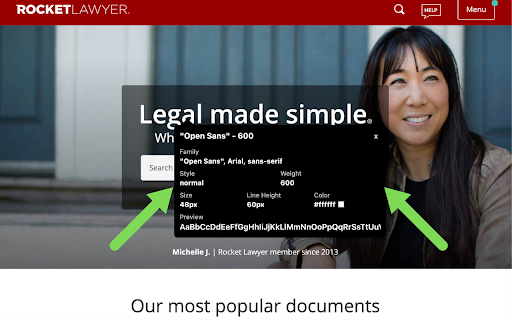


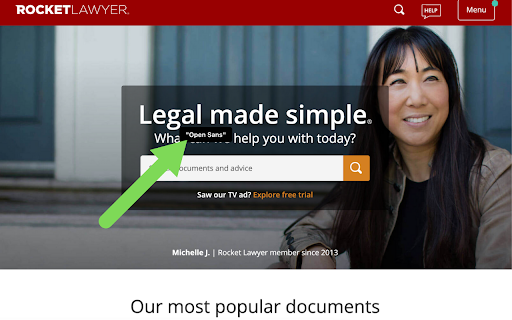
Identify what font is on the web page.
Find out what font is on any web page that you are on.
It literally tells you which font the text is that you hover over AND it tells you the 'Family', 'Style', 'Weight', 'Size', 'Line Height', and the 'Color'.
*Refresh your screen to exit out of the extension*
Also, if the extension is not working or a certain function is not working, please go the 'Support' tab and write the issue there. Please don't leave a negative review when something can be easily fixed. Our team is constantly monitoring the review and support tabs so we will respond fairly quickly.
If you have a suggestion of what you think should be added to the extension, please let us know and we will consider adding it!!
You can also email us via the 'Contact the Developer' hyperlink under the 'Developer' section on the right side the page!
⭐ Hover & find out what font it is. ⭐
| 分类 | 💻开发者工具 |
| 插件标识 | alannkadjimikdglagjkfdnmcdjkahhc |
| 平台 | Chrome |
| 评分 |
☆☆☆☆☆
|
| 评分人数 | |
| 插件主页 | https://chromewebstore.google.com/detail/find-that-font-font-finde/alannkadjimikdglagjkfdnmcdjkahhc |
| 版本号 | 5.4.6 |
| 大小 | 109KiB |
| 官网下载次数 | 819 |
| 下载地址 | |
| 更新时间 | 2021-04-07 00:00:00 |
CRX扩展文件安装方法
第1步: 打开Chrome浏览器的扩展程序
第2步:
在地址栏输入: chrome://extensions/
第3步: 开启右上角的【开发者模式】
第4步: 重启Chrome浏览器 (重要操作)
第5步: 重新打开扩展程序管理界面
第6步: 将下载的crx文件直接拖入页面完成安装
注意:请确保使用最新版本的Chrome浏览器