
Google Analytics Debugger Chrome 插件, crx 扩展下载
A browser extension for debugging Google Analytics tracking code
Google Analytics Debugger is a devtools extension for exposing tracking beacon data to developers.
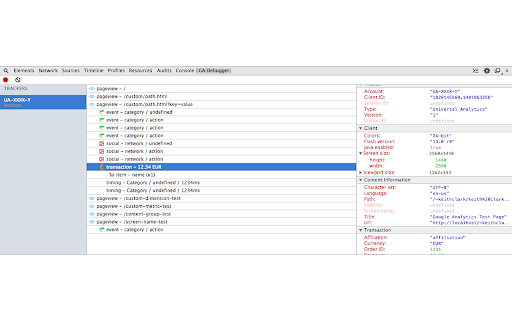
Live data capture
Capture tracking beacons for Traditional and Universal Analytics properties while you browse. Beacons are automatically grouped by page context, making it easy to identify how tracked events relate to each other.
Beacon inspector
Review meta data for every tracking beacon sent to the Google Analytics servers with the context sensitive inspector.
Tracker properties
Client information
Document properties
Page views
Events
E-commerce transactions
User timings
Social interactions
Custom variables
Custom dimensions
Custom metrics
Content groups
Campaign tracking
Multiple tracker Support
Google Analytics supports multiple trackers on a single website, allowing specific metrics to be captured into different accounts. GA Debugger will capture beacons sent from every tracker on a page, grouping them together for easy navigation and interrogation.
| 分类 | 💻开发者工具 |
| 插件标识 | jiokjpcfnipnicblkgdklknjjeohnfln |
| 平台 | Chrome |
| 评分 |
☆☆☆☆☆
|
| 评分人数 | |
| 插件主页 | https://chromewebstore.google.com/detail/google-analytics-debugger/jiokjpcfnipnicblkgdklknjjeohnfln |
| 版本号 | 102 |
| 大小 | 27.1KiB |
| 官网下载次数 | 30000 |
| 下载地址 | |
| 更新时间 | 2017-04-12 00:00:00 |
CRX扩展文件安装方法
第1步: 打开Chrome浏览器的扩展程序
第2步:
在地址栏输入: chrome://extensions/
第3步: 开启右上角的【开发者模式】
第4步: 重启Chrome浏览器 (重要操作)
第5步: 重新打开扩展程序管理界面
第6步: 将下载的crx文件直接拖入页面完成安装
注意:请确保使用最新版本的Chrome浏览器