
Reverse Image Search Chrome 插件, crx 扩展下载

一个建立在TinEye/Google图像引擎之上的强大的捕获反向图像搜索工具
"Reverse Image Search" extension helps you to find similar images or the original image source and its name. This is a useful tool to find for instance the actual image name or detect whether this image is unique or is just a copy or a modified copy of an already existed image on the web.
In most cases, images are embedded in the background page and hence it is not straightforward to find the actual source of them to be passed to a reverse image search engine. Also, the image you are looking for maybe just part of a video stream. This extension solves these problems by providing a capturing tool in the right-click context menu. Simply select the item and capture a portion of the screen. The captured image is automatically sent to either "TinEye" or "Google Images" search engine, and after a successful upload, a new page with the matching results is displayed.
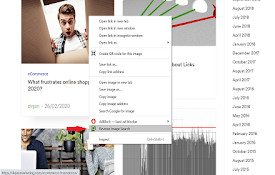
This extension adds three items to the context menu of your browser:
1. Google Images (Image URL)
2. Tineye (Image URL)
3. Google Images (Capture)
The first two items are added to the image context menu, and the third one is added to the page context to activate the capturing tool. Instead of the third option, you can alternatively press the browser action button.
Links:
FAQs Page: https://add0n.com/reverse-image-search.html
GitHub Page: https://github.com/schomery/reverse-image-search/
| 分类 | 🛠️工具 |
| 插件标识 | clijmpalajoikbhdhgmpanldenogllaj |
| 平台 | Chrome |
| 评分 |
☆☆☆☆☆
0
|
| 评分人数 | 8 |
| 插件主页 | https://chromewebstore.google.com/detail/reverse-image-search/clijmpalajoikbhdhgmpanldenogllaj |
| 版本号 | 0.3.0 |
| 大小 | 129KiB |
| 官网下载次数 | 5000 |
| 下载地址 | |
| 更新时间 | 2021-08-10 00:00:00 |
CRX扩展文件安装方法
第1步: 打开Chrome浏览器的扩展程序
第2步:
在地址栏输入: chrome://extensions/
第3步: 开启右上角的【开发者模式】
第4步: 重启Chrome浏览器 (重要操作)
第5步: 重新打开扩展程序管理界面
第6步: 将下载的crx文件直接拖入页面完成安装
注意:请确保使用最新版本的Chrome浏览器
同类插件推荐

Reverse Image Search
Easily reverse image search with Google image sear

Reverse Image Search
Search similar images in the WEB from context menu

Image Searcher
Search similar image by "Google search by Ima

Image Search
Find similar images in popular search enginesSearc

Search image with Yandex
Search for similar images in Yandex with open sour

PhotoTracker Lite
Fast and free one-click image duplicates search in
Reverse Image Search
Right click on an image and find it's origin i

Image Search
Quickly search for images.Search for images in mul

Reverse Image Search
添加一组支持通过多个提供商搜索的右键菜单Adds an option to the context

Reverse Image Search
一个建立在TinEye/Google图像引擎之上的强大的捕获反向图像搜索工具"Revers

RevEye Reverse Image Search
Perform a search by image. Choose between the imag

TinEye Reverse Image Search
This is the official TinEye Chrome extension. Find

Search by Image
A powerful reverse image search tool, with support