
Malware & URL Scanner Chrome 插件, crx 扩展下载
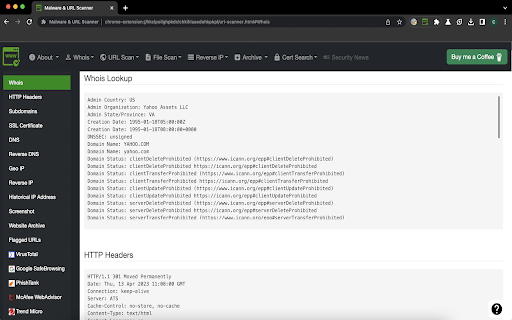
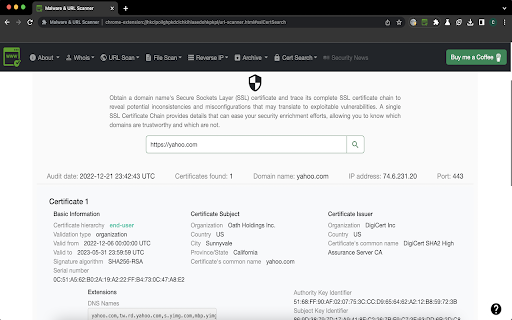
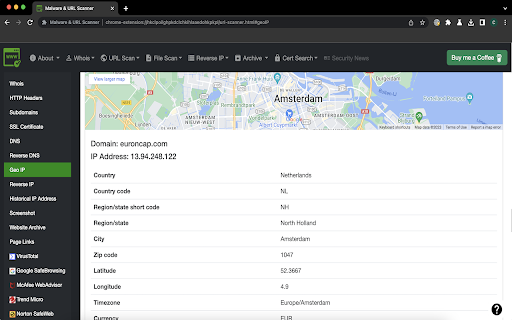
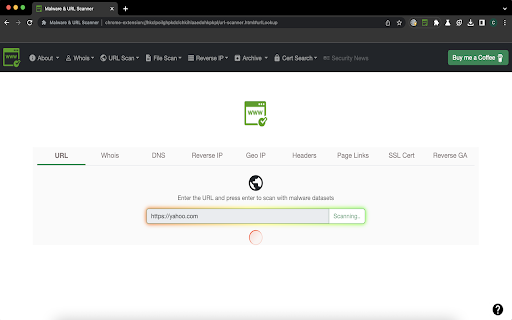
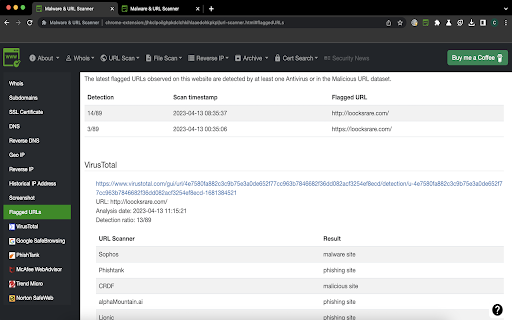
Malware & URL Scanner Chrome extension helps to scan websites or domain, IP for malware, phishing, and spam content.
The URL & Malware Scanner - Stay protected from malicious, phishing, scam websites when visit or redirect to suspicious URL and malware from infecting your windows or mac by using this extension. Now, this extension available on all major browsers Chrome, Firefox and Microsoft Edge.
Note: This extension is built with freely available resources so it comes with restricted usage per day basis. We are working on to come up with upgraded version soon. You can consider supporting me with a dime to continue to develop and enhance extension features and maintenance. If you would like to support, please visit Buy Me A Coffee https://www.buymeacoffee.com/d09r to donate.
Hi there,
I would like to hear your valuable feedback or requirements to consider in upcoming features, if you have any such feature request or come across any usage issues and would like to contribute to improve the user experience, then please provide a rating and leave a comment on the Chrome Web Store review page.
Thanks,
D09r
Features:
- URL lookup & File scan with Malware datasets or Antivirus (VirusTotal, Google Safe Browsing, PhishTank, WOT, McAfee, Norton, Trend Micro)
- Whois lookup
- Website's SSL certificate lookup
- Geolocation IP lookup
- Reverse IP lookup
- DNS & Reverse DNS lookup
- Reverse Google Analytics lookup
- Website historical screenshots lookup
- Live HTTP headers and website extract URLs
- Google's cache & Internet Archive Wayback Machine cache lookup
- Website category & subdomains lookup
- Website passive DNS replication lookup
- Using Google dork search queries to gather info for an URL investigation
Upcoming features:
-- Security News
-- Copy or download scan report
-- urlscan.io lookup
-- Multilingual support
-- Beta release for Safari browser
>> Mozilla Firefox
This extension also available for Firefox browser (Desktop and Android smartphones): https://addons.mozilla.org/firefox/addon/malware-url-scanner/
>> Microsoft Edge
This extension also available for Microsoft Edge browser: https://addons.mozilla.org/firefox/addon/malware-url-scanner/
[!] Report bugs, feature request
- Please report it at https://chrome.google.com/webstore/detail/ianpniapgjchiheejeipopldaanbjicd/support
[#] Take a look at my other extensions
For Chrome: https://chrome.google.com/webstore/search/d09r?_category=extensions
For Firefox: https://addons.mozilla.org/firefox/user/D09r/
For Microsoft Edge: https://microsoftedge.microsoft.com/addons/search/d09r
#d09r
| 分类 | 💻开发者工具 |
| 插件标识 | ianpniapgjchiheejeipopldaanbjicd |
| 平台 | Chrome |
| 评分 |
★★★★☆
4.8
|
| 评分人数 | 4 |
| 插件主页 | https://chromewebstore.google.com/detail/malware-url-scanner/ianpniapgjchiheejeipopldaanbjicd |
| 版本号 | 1.0 |
| 大小 | 681KiB |
| 官网下载次数 | 10000 |
| 下载地址 | |
| 更新时间 | 2023-04-16 00:00:00 |
CRX扩展文件安装方法
第1步: 打开Chrome浏览器的扩展程序
第2步:
在地址栏输入: chrome://extensions/
第3步: 开启右上角的【开发者模式】
第4步: 重启Chrome浏览器 (重要操作)
第5步: 重新打开扩展程序管理界面
第6步: 将下载的crx文件直接拖入页面完成安装
注意:请确保使用最新版本的Chrome浏览器
同类插件推荐

Malware Protection
RR Malware Protection automatically scans webpages

IP, DNS & Security Tools | HackerTarget.com
Quick access to IP, DNS & Network Tools. Check

分析-URL检查工具
分析-URL检查工具提供有关Whois,子域,广告,分析,实时HTTP标头,存档,信誉,网站恶意软件

MalwareAI Browser Security
The MalwareAI Browser Security extension provides

Security Tweaks
Improve your online security with few tweaks via t

Retruster Phishing Protection
Stop phishing with Retruster. Be alerted to phishi

WebWall - Internet Security & Privacy Safety
WebWall is the best internet security and internet

ipty.de/av - Virus/Malware Link/File Checker
Website Virus/Malware Link and File Checker. We wa

Malware & URL Scanner
Malware & URL Scanner Chrome extension helps t

Online Security Pro
针对恶意软件,网络钓鱼和恶意网站的在线安全性。通过Comodo的实时保护,保护您自己,您的家人和您的

Link Virus Check - Security Plus
Provides free checking of urls for viruses. It use

Virus Checker for Downloads
Automatically check all the download files against

Cyber Web Tools
Chrome extension to analysis your website security